



Feed Aggregator
Upgrading from MariaDB 10.4 to MariaDB 10.5 Galera Cluster
Because upgrading from MariaDB 10.4 to MariaDB 10.5 (non-clustered) seems not to be a problem
[ 1
] we take the challenge and try to create a receipt based on the MariaDB 10.3 to MariaDB 10.4 Galera Cluster upgrade documentation
[ 3
]:
Before you start
Before you begin with the upgrade you should consider a few things:
- Downgrade is officially not supported!
[ 4
] It might work, or not. - So you should have taken a proper an clean backup before you start with the upgrade and you should be sure the restore works as well!
- It is recommended to upgrade to the newest MariaDB minor release first
[ 5
] before you upgrade to a new major release. This reduces the risk that you run into already known and fixed bugs. - Take a look at Upgrading from MariaDB 10.4 to MariaDB 10.5
[ 1
] to see what has changed between the major versions. - New MariaDB Major Release may behave differently than older MariaDB Major Release. Thus you should test the new major release series first before putting it into production!
- Ideally, you want …
Taxonomy upgrade extras: mariadb, upgrade, cluster, galera cluster, rolling upgrade, 10.4, 10.5,
Partial Restore of a Table into a MariaDB Galera Cluster
In my former Blog Post Partial Table or Schema restore from mariabackup full backup we worked out the basics of a partial restore of a table into a MariaDB database instance.
An now we use this know-how to try the same procedure on a Galera Cluster.
The backup is done in the exact same way as described in the mentioned article. We can even use the backup made there.
For the restore we use the following procedure:
Prepare and Restore a table
# BACKUPDIR="/home/mysql/bck/qamariadb105/daily"
# DATADIR="/home/mysql/database/magal-105-a/data"
# SCHEMA="world"
# TABLE="City"

# mariabackup --prepare --export <br>
   --databases="${SCHEMA}" <br>
   --tables="${TABLE}" <br>
   --datadir=${DATADIR} <br>
   --target-dir=${BACKUPDIR}
But now comes the little difference to a simple MariaDB database instance. The following operations have to be done on ALL nodes of the Galera Cluster:
SQL> ALTER TABLE `world`.`City` DISCARD TABLESPACE; …Taxonomy upgrade extras: backup, restore, schema, database, physical backup, mariabackup, table restore, schema restore, partial restore, database restore,
Partial Table or Schema restore from mariabackup full backup
For me it was for a long time not clear if a mariadb-backup full backup can be used to do partial table or schema restores. Now we faced this challenge with a customer. So time to try it out…
This test was made with MariaDB 10.5.5. So it may not work with some older MariaDB releases…
Backup
Because I do not know during the backup if I need a full or a partial restore I always want to do a full mariadb-backup backup!
The full backup can be done as normal but the prepare should not be done yet during the backup (or I am not sure if the prepare can be done twice, first without --export during the backup and next with --export during the restore). Further I am not sure yet if a backup treated with --export can later be used for a full restore once more. Further research has to be done in this area…
For a partial table or schema restore we need the CREATE TABLE statements as well. So it makes sense to also backup the table structures already during backups. This avoids troubles or cumbersome …
Taxonomy upgrade extras: backup, restore, schema, database, physical backup, mariadb-backup, table restore, schema restore, partial restore, database restore,
MariaDB MaxScale Configuration Variables
Table of Contents
- Global Options
- Service Options
- Server Options
- Routing Modules
- Listener Options
- Monitor Options
- Filter Options
Global Options
| Variable | Versions | Values | Default | Unit | Comment | ||||
| threads | 1.4 | 2.3 | 2.4 | 2.5 | { <n> | auto } | 1 | thread | ||
| thread_stack_size | 2.2 | <n> | Ignored and deprecated in 2.3 | ||||||
| rebalance_period | 2.5 | <n> | 0 | second | |||||
| rebalance_threshold | 2.5 | <n> | 20 | delta load | |||||
| rebalance_window | 2.5 | <n> | 10 | second | |||||
| auth_connect_timeout | 1.4 | 2.2 | 2.3 | 2.4 | <n> | 3 | second | ||
| auth_read_timeout | 1.4 | 2.2 | 2.3 | 2.4 | <n> | 1 | second | Deprecated in 2.5 | |
| auth_write_timeout | 1.4 | 2.2 | 2.3 | 2.4 | <n> | 2 | second | Deprecated in 2.5 | |
| query_retries | 2.3 | 2.4 | 2.5 | <n> | 1 | time | Added in 2.1.10, disabled by default until 2.3.0 | ||
| query_retry_timeout | 2.3 | 2.4 | 2.5 | 5 | |||||
| passive | 2.3 | 2.4 | 2.5 | false | |||||
| ms_timestamp | 1.4 | 2.3 | 2.4 | 2.5 | { 0 | 1 } | 0 | - | ||
| skip_permission_checks | 2.3 | 2.4 | 2.5 | { 0 | 1 } | 0 | ||||
| syslog | 1.4 | 2.3 | 2.4 | 2.5 | { … | ||||
Taxonomy upgrade extras: mariadb, maxscale, configuration, variables, load balancer,
Categories:
FromDual Backup and Recovery Manager for MariaDB and MySQL 2.2.2 has been released
FromDual has the pleasure to announce the release of the new version 2.2.2 of its popular Backup and Recovery Manager for MariaDB and MySQL (brman).
The new FromDual Backup and Recovery Manager can be downloaded from here. The FromDual Repositories were updated. How to install and use the Backup and Recovery Manager is describe in FromDual Backup and Recovery Manager (brman) installation guide.
In the inconceivable case that you find a bug in the FromDual Backup and Recovery Manager please report it to the FromDual Bugtracker or just send us an [email](mailto:contact@fromdual.com?Subject=Bug report for brman).
Any feedback, statements and testimonials are welcome as well! Please send them to feedback@fromdual.com.
Upgrade from 2.x to 2.2.2
shell> cd ${HOME}/product
shell> tar xf /download/brman-2.2.2.tar.gz
shell> rm -f brman
shell> ln -s brman-2.2.2 brman
Changes in FromDual Backup and Recovery Manager 2.2.2
This release is a new minor release. It contains only bug fixes. We have tried to …
Taxonomy upgrade extras: backup, restore, recovery, pitr, brman, release, bman, rman, fromdual backup and recovery manager,
SQL Query Tuning - Performance
How could the following SQL queries be improved performance wise and otherwise and can you also explain why your change is more optimal?
Please consider, when testing, that your results are not confused by the Query Cache or by reading data from your I/O system which are an order of magnitude faster (Query Cache) or slower (I/O) than the in-memory behaviour.
Table of Contents
- Covering function
LIKEsearch- Covering function twice
- Compare 2 indexed columns
- Function and 2 indexed columns
- Time series problem
- Wrong built index or query
- OR optimization
- Nested subquery
DELETE - Wrong casting
- Non normalized join column
- Optimizer is not considering ICP
- OR optimization with Materialized View
SQL Query Tuning - Covering function
Difficulty: Very easy.
Query:
SELECT *
  FROM bills
 WHERE UNIX_TIMESTAMP(due_date) < 1601560170
;
Table and data:
CREATE TABLE bills (
  id INT UNSIGNED NOT NULL AUTO_INCREMENT PRIMARY KEY
, amount DECIMAL (10,2) NOT NULL
, due_date DATETIME NOT NULL
, customer_id SMALLINT UNSIGNED NOT NULL …
Taxonomy upgrade extras: query, tuning, optimizer, sql, performance,
Categories:
Creating synthetic data sets for tuning SQL queries
When it comes to SQL Query tuning with customers we often get the slow running SQL query and possibly, in good cases, also the table structure. But very often, for various reasons, we do not get the data.
SQL query tuning on an empty table or a table with only little data is not really fun because either the results of the optimizer have nothing to do with reality or the response times do not really show if your change has improved anything. For example if your query response time before the change was 2 ms and after 1 ms this can be either the consequence of your improvement but more probable a hiccup of your system.
So what to do to get valid results from your SQL query optimizer during SQL query tuning?
- The best case is you get real data from the customer in size and content.
- The second best case is if you get real data from the customer in content. So you can analyze this content and synthetically pump it up.
- The worst case is if you get no data at all from your customer. In this case you have to create …
Taxonomy upgrade extras: performance, tuning, query, optimizer, sql, explain, optimizing, query tuning, performance tuning, data,
Kernel Documentation
And this is what the Linux kernel documentation says about it: https://www.kernel.org/doc/Documentation/networking/bonding.txt
Taxonomy upgrade extras:
Categories:
MyISAM locking and who is the evil?
Yes, I know, MyISAM is deprecated and unofficially discontinued by the vendors. But we still have from time to time customers using MyISAM and even evangelize for MyISAM…
And to be honest in some cases MyISAM has even advantages (beside some huge disadvantages) over other Storage Engines (simple file copy, footprint, single-query latency, …). But most of our customers are not aware of these advantages and are using MyISAM just because they did it since ever…
One of the biggest problems we see at customers is the MyISAM table lock behaviour. They claim things like the database stalls, crashes or stocks beside other non-qualified expressions. Which is typically not the case but the database just runs out of connections because they reach the max_connections fuse. In fact what happens is that one long running writer connection blocks an important and frequently used (MyISAM) table and other writer and reader connections have to wait (Waiting for table level lock) until the writer finishes …
Taxonomy upgrade extras: myisam, lock, locking,
Good explanation for bond interfaces
802.3ad bond interface have show high RX dropped packets
I found a god explanation for dropped packages on bonded interfaces: [ 1 ]
This is related to the bonding mode and _not_ a bug. The bonding module will drop duplicate frames received on inactive ports, which is normal behaviour. Overall the packets should be getting into the machine without problems since they are received on the active slave. To confirm this do the following
1) Check dropped packets from all interfaces. So if eth0/eth1 are connected to bond0, we may see dropped packets for bond0 and eth0, but not for eth1. This depends on which interface is the active interface. This can be checked using the following:
cat /sys/class/net/bond0/bonding/active_slave
So if the active_slave isn't dropping packets, and the inactive slave is dropping packets this is normal in 'active-backup' mode (or any mode where there is an inactive slave).
2) If we want both interfaces to not drop packets we can use 'all_slaves_active' bonding module parameter. …
Taxonomy upgrade extras:
Categories:
Solutions
I have described 3 different ways to "solve" the problem above:
- I assume MySQL has just disabled the Note?
- You can find various advices in the Internet about how to get rid of this Note:
- So I strongly assume it is a noisy-neighbour problem. ... Because we did not cause more load and over-saturated the system it must be triggered externally:
So find out, which one of the latter two will help you.
Taxonomy upgrade extras:
Categories:
PageCleaners issue
only Problem statement, where is the solution to this issue of Page Cleaners?
Taxonomy upgrade extras:
Categories:
MariaDB and MySQL package holding or locking
Repositories from your favourite Linux distribution and from your favourite database software vendor get regular package updates. If you do periodic system upgrades (for example every 2 weeks as we do) you get the newest packages of a release series.
Unfortunately recently the software vendors started not only to fix bugs in new releases but also to introduce new features. And when you fix bugs or introduce new stuff new bugs might appear.
To avoid being hit unexpectedly by new bugs you do not want to upgrade untested software. To achieve this you want to keep/not upgrade some important packages. For example the MariaDB or MySQL server package.
This package pinning is called package version lock on CentOS and Redhat and package holding on Debian and Ubuntu.
How you do this I have summarized below:
Debian / Ubuntu
See also apt_preferences (APT pinning) and man 5 apt_preferences
shell> dpkg -l | grep mariadb
ii  libmariadb3:amd64                     3.0.3-1build1                                   amd64 …
Taxonomy upgrade extras: debian, ubuntu, centos, package, upgrade, lock, locking, hold, redhat, pin, red hat,
MariaDB SQL Error Log Plugin
When you are for too long in business you think you know already everything and you are getting lazy. This happened to me again a few weeks ago. A customer asked me about the SQL Error Log Plugin. First I though he was talking about the MariaDB Error Log or the General Query Log. But then I have learned that there is something “new” I did not know yet…
MariaDB introduced in 5.5.22 (March 2012) a new plugin called the SQL Error Log Plugin. This Plugin collects all the errors which were sent from the MariaDB daemon to applications/clients and writes it to a log file.
This Client error log file can be analysed later to find and fix bugs in the application if the applications did not catch the errors themselves.
Installation
The Plugin can be easily installed with:
SQL> INSTALL PLUGIN sql_error_log SONAME 'sql_errlog';
and uninstalled again with:
SQL> UNINSTALL PLUGIN sql_error_log;
Query OK, 0 rows affected, 1 warning (0.002 sec)
The installation and uninstallation informations are …
Taxonomy upgrade extras: mariadb, sql, error, logging, error log, syntax,
FromDual Ops Center File Transfer
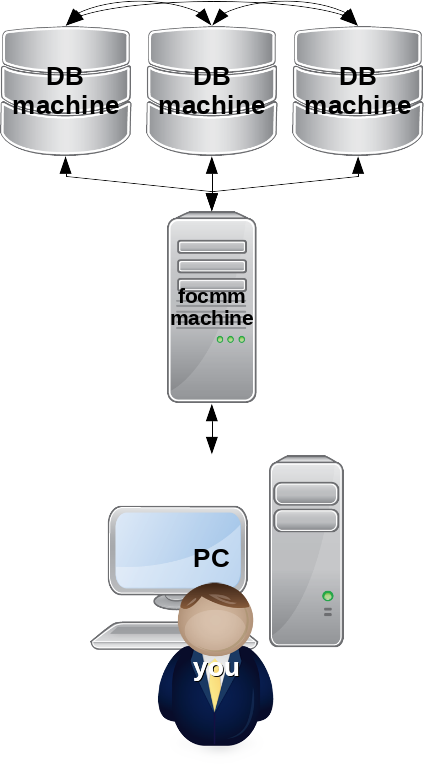
With the FromDual Ops Center file transfer tool you can easily upload files from your personal computer to the focmm machine, download files from the focmm machine to your personal computer or transfer files from the focmm machine to any of your database machines or between them. This feature is made for importing, exporting or transferring data from, to or between your different database instances. For example to copy a production schema to a testing database instance.
For backup and restore of a database instance or schema see Operations.
You can reach the file transfer tool under the menu Tools on the left and then File transfer.
Upload
For uploading a file just click to the button, select a file from your local file system and then click to .
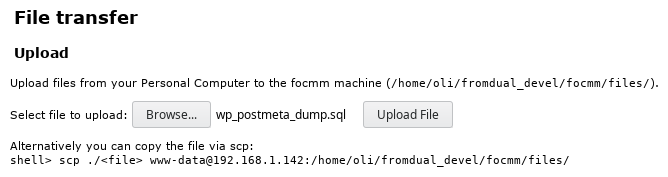
After a while, when the upload is completed, the file will appear in the Download section of your focmm machine.
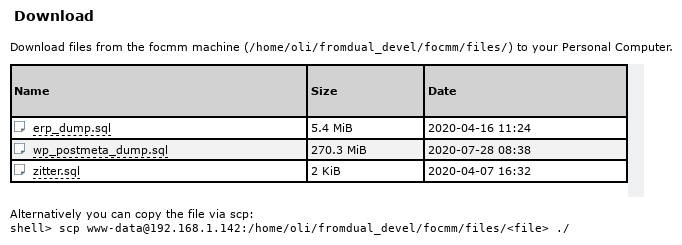
Alternatively you can also upload files from your personal computer to the focmm machine via your favourite file transfer …
Taxonomy upgrade extras: focmm, fromdual ops center, file, file transfer,
Centralized Crontab with FromDual Ops Center
One of the tools of FromDual Ops Center for MariaDB and MySQL is the centralized crontab for all of your database machines. Instead of maintaining various different crontabs on different machines you can manage them now in one place within the Ops Center.
Under the Tools menu on the left you find Crontab. Here you get a first overview of crontab jobs available:

- The first column shows if the crontab job is active or not.
- The second column indicates the O/S user the crontab job should run as.
- Then we have the typical crontab scheduling entries: Minute, Hour, Day, Month and Day of Week (DoW).
- Now follows the actual command which should be run with a comment describing the command.
- The column Last indicates when the job was run last successfully.
- And RC shows the last Return Code of the job (0 - success, otherwise error number).
- With the trash icon you can delete a crontab job and with the run icon you can start and run a crontab job right now.
With the button on the bottom you can add new …
Taxonomy upgrade extras: focmm, fromdual ops center, crontab, centralization,
WMware snapshots or Veeam backups
We have found a strong correlation between VMware snapshots and Veeam backups and those dropped packets.
Taxonomy upgrade extras:
Categories:
InnoDB full-text index corruption
In a recent customer engagement we experienced a lot of corrupted (normal) indexes and also corrupted full-text indexes on InnoDB tables in a Galera Cluster (v10.4.13).
In the error log we did not see which table it was but we have only a few log entries every here and there indicating a full-table index is corrupt:
2020-07-08 22:09:03 0 [ERROR] InnoDB: (Duplicate key) writing word node to FTS auxiliary index table.
2020-07-08 22:09:06 0 [ERROR] InnoDB: (Duplicate key) writing word node to FTS auxiliary index table.
2020-07-08 22:09:09 0 [ERROR] InnoDB: (Duplicate key) writing word node to FTS auxiliary index table.
So we tried to figure out which database files were touch in the indicated time:
shell> ls -ltr */FTS_*.ibd | tail -n8
-rw-rw---- 1 mysql mysql    98304 Jul  8 22:09 test/FTS_00000000000005ee_00000000000011d3_INDEX_4.ibd
-rw-rw---- 1 mysql mysql    98304 Jul  8 22:09 test/FTS_00000000000005ee_00000000000011d3_INDEX_5.ibd
-rw-rw---- 1 mysql mysql    98304 Jul  8 22:09 …
Taxonomy upgrade extras: innodb, full-text, index, corruption, index file,
Categories:
Increase file limit of a running process
Asking stupid questions and googling for them is fun some times…
Today I was asking myself if one could rise the file limit for a running MariaDB mysqld process online without restarting the database instance?
And I found an answer on serverfault: Set max file limit on a running process:
PID=$(pidof mysqld)

grep -e 'Max open files' -e Limit /proc/${PID}/limits
Limit                     Soft Limit           Hard Limit           Units
Max open files            1024                 4096                 files

prlimit --pid $PID | grep -e NOFILE -e DESC
RESOURCE   DESCRIPTION                             SOFT      HARD UNITS
NOFILE     max number of open files                1024      4096 files

prlimit  --nofile --output RESOURCE,SOFT,HARD --pid ${PID}
RESOURCE SOFT HARD
NOFILE   1024 4096

sudo prlimit --nofile=2048:8192 --pid ${PID}

prlimit  --nofile --output RESOURCE,SOFT,HARD --pid ${PID}
RESOURCE SOFT HARD
NOFILE   2048 8192
Literature
See also:
Taxonomy upgrade extras: open_files_limit, limitnofile, file handles,
New Warning: P_S Metadata Lock instrumentation is disabled
With this new version of fpmmm you probably get a new warning in your fpmmm error log:
INFO: FromDual Performance Monitor for MySQL and MariaDB (fpmmm) (1.2.0) run started.
WARN:     P_S Metadata Lock instrumentation is disabled. (rc=1411)
INFO: FromDual Performance Monitor for MySQL and MariaDB (fpmmm) run finished (rc=0).
In this fpmmm release we start monitoring MariaDB/MySQL Metadata locking problems. For this new functionality the Metadata locking plugin in MariaDB or the Metadata instrumentation in MySQL PERFORMANCE_SCHEMA must be enabled. This can be done dynamically and persistent for MariaDB:
mariadb> INSTALL SONAME 'metadata_lock_info';
and dynamically for MySQL:
mysql> UPDATE performance_schema.setup_instruments SET enabled = 'YES', timed = 'YES' WHERE name = 'wait/lock/metadata/sql/mdl';
or persistent for MySQL:
#
# my.cnf
#
performance_schema_instrument = 'wait/lock/metadata/sql/mdl=ON'
Taxonomy upgrade extras:
Categories:
Pages

